90 Minutes Instead of 3 Days: AI-Powered UX Design

When our clinical stakeholders requested a simple sorting feature for the TouchWorks EHR Immunization grid, I knew we had a micro-interaction problem that AI could help us solve quickly. Users wanted to view immunization history in different chronological orders—most recent first or oldest first. Simple request, but the design implications weren't trivial.
The Old Way: Hours of Research and Design
Traditionally, this would have been a multi-day process:
Day 1: Research UI patterns, review design systems, explore competitor solutions
Day 2: Sketch concepts, create high-fidelity mockups of 3-4 options
Day 3: Present to stakeholders and iterate
That's a full week before we even get to development.
The AI-Powered Approach: Real-Time Exploration
Instead, I turned to Claude and described the problem: a healthcare immunization grid that needed a sorting control. Within minutes, I had:
6 distinct design options with full pros/cons analysis
Interactive prototypes I could click through immediately
Solutions I hadn't considered, like segmented controls and hybrid approaches
Implementation-ready code matching our exact design system
The AI didn't just give me generic solutions—it analyzed the specific context of healthcare UX, considered accessibility requirements, and even factored in the existing UI constraints.

Speed Without Sacrificing Quality
What impressed me most wasn't just the speed—it was the depth. Each option came with:
Visual mockups showing exact placement
Usability considerations specific to clinical workflows
Accessibility implications
Space efficiency analysis

When I needed adjustments (like keeping the "Last Given" column static during sorts), the prototype updated instantly. No back-and-forth with designers, no waiting for mockup revisions.
Client Reviews Became Conversations
The real win came in stakeholder reviews. Instead of presenting 2-3 polished options after days of work, I showed up with an interactive prototype the same day as the request.
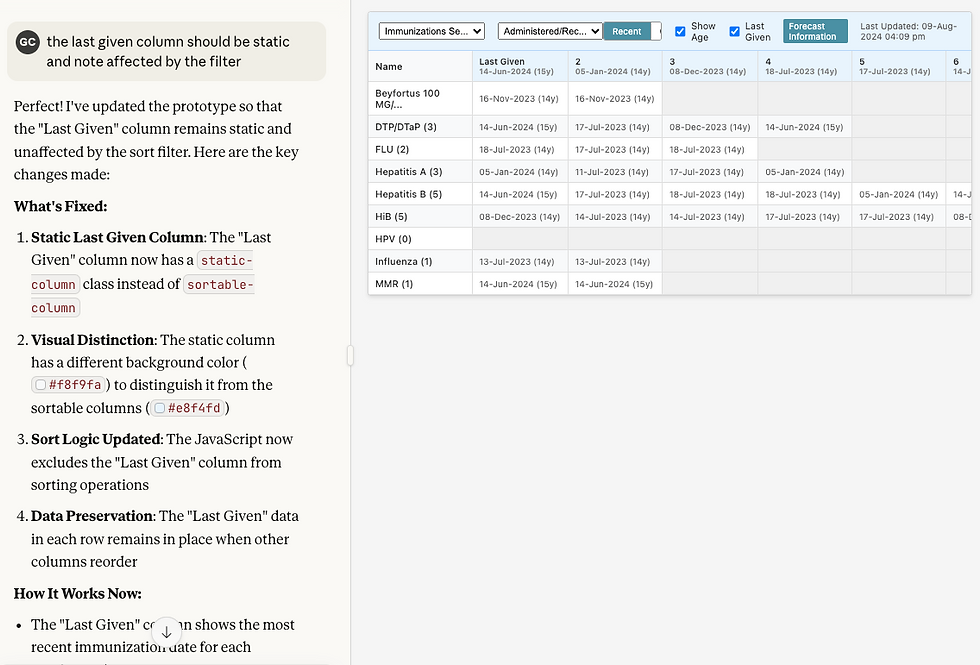
We could:
Click through different sorting behaviors in real-time
Discuss trade-offs immediately
Make live adjustments during the meeting
Get sign-off before the meeting ended
The conversation shifted from "which static mockup do you prefer?" to "let's explore this together and find what works best."
The UX Process, Reimagined
AI hasn't replaced the UX process—it's accelerated the exploration phase and freed me up for higher-value activities:
More time for user research and validation
Faster iteration on concepts based on feedback
Broader exploration of design patterns I might not have considered
Better documentation with built-in rationale for each approach
What This Means for Healthcare UX
In healthcare, speed matters—but so does getting it right. AI tools let us move fast without compromising on thoughtfulness.
We can:
Respond to clinical feedback quickly
Test more variations with users
Reduce the time from "problem identified" to "solution deployed"
Focus our design expertise on strategic decisions, not repetitive exploration
The Bottom Line
What used to take 2-3 days now takes 30 minutes. But here's what really matters: the quality improved. With AI handling the exploration and prototyping grunt work, I can focus on understanding user needs, evaluating options critically, and ensuring solutions work in real clinical workflows.
It's about amplifying our ability to solve problems quickly and thoughtfully. And in healthcare, where every workflow improvement can impact patient care, that speed matters.
This sorting control is now being implemented in TouchWorks EHR, with a segmented control design that emerged from this AI-assisted exploration process, vetted with users via Formative UX sessions.


Comments